Cursive Title Generator — Create Elegant Headers & Headings
Transform your titles, headers, and headings into eye-catching cursive text. Our free cursive title generator offers 35+ elegant script styles for presentations, blogs, social media, and events — copy and paste anywhere instantly.
Text up to 35 characters per line (maximum 3 lines)
Cursive Titles for Presentations

Presentations with cursive titles immediately stand out from standard-font slides. The cursive title generator creates elegant headings you can paste directly into PowerPoint, Google Slides, or Keynote.
Best practices for presentation titles:
- Use the cursive title generator for your cover slide and section dividers only — body text should stay plain
- Choose calligraphy styles for formal business decks, brush scripts for creative pitches
- Set the cursive title generator to the largest size (48-72px) so titles dominate the slide
- Keep titles short (3-5 words) — cursive is a visual accent, not for paragraphs
Title Designs for Every Platform
The cursive title generator creates titles optimized for different platforms and use cases.
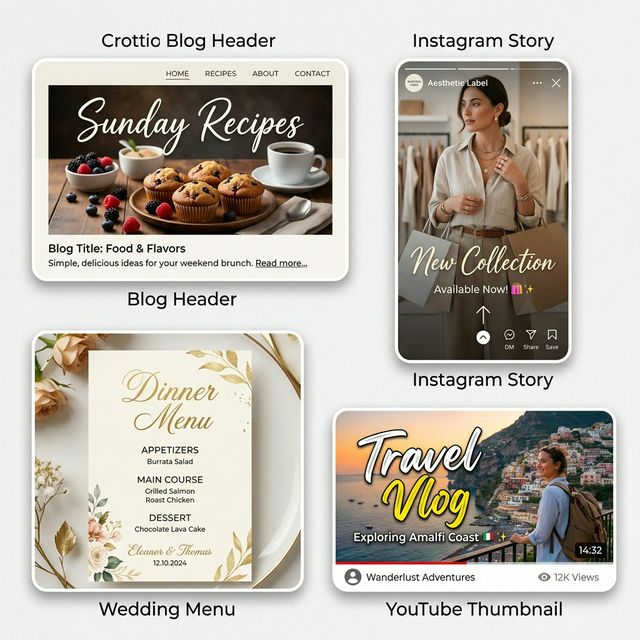
📝 Blog Headers
A cursive title at the top of a blog post signals care and creativity to readers. Use the cursive title generator for your article headline.
📱 Instagram Stories
Cursive text overlays on Stories feel premium and aesthetic. The cursive title generator outputs Unicode that pastes directly into Instagram text tools.
💒 Wedding & Events
Menus, programs, welcome signs — the cursive title generator previews how your event headings will look in calligraphy before ordering prints.
🎬 Video Thumbnails
YouTube and TikTok thumbnails with cursive titles stand out in crowded feeds — creating an elegant, premium feel.
How to Use the Cursive Title Generator
Type your heading
Enter your title, header, or heading text. Keep it concise — 2-5 words work best in the cursive title generator.
Browse heading styles
Explore all font categories. Signature fonts create authoritative headers; Handwritten fonts feel personal and warm.
Set large size
Titles should be big — set 48px or higher in the cursive title generator for maximum visual impact.
Copy and deploy
Paste your cursive title into presentations, blog editors, social media, or design tools like Canva.
Font Pairing Tips for Cursive Titles
A cursive title looks best when paired with a complementary body font. The contrast between an ornate cursive title generator heading and clean body text creates visual hierarchy that guides the reader's eye. Here are proven pairings:
- Cursive title + Sans-serif body (e.g., cursive heading with Inter or Open Sans) — modern and clean, ideal for web and presentations
- Cursive title + Serif body (e.g., cursive heading with Georgia or Times) — classic and authoritative, perfect for print and formal documents
- Cursive title + Handwritten body — avoid this combination, as two decorative fonts compete for attention and reduce readability
Why Your Title Font Choice Matters
Research shows that typography accounts for up to 95% of web design — and titles are the first typographic element readers notice. A well-chosen cursive title created with the cursive title generatorcommunicates elegance, creativity, and attention to detail before a single word of body copy is read.
Whether you are designing a professional signature to match your heading style, or creating a complete brand identity with matching name styling, consistent cursive typography builds recognition and trust across all your materials.
Cursive Titles for Education and Events
Beyond corporate presentations and social media, elegant script headings serve educators, event planners, and nonprofit organizations. Teachers create eye-catching bulletin board headings that engage students, while event coordinators design welcome banners and ceremony programs that feel polished and professional. Nonprofit organizations use elegant script headings on fundraiser invitations and annual reports to convey a sense of occasion and importance. The right typography transforms ordinary materials into ones that command attention and respect.
Cursive Title Typography Best Practices
When designing with cursive headings, keep these professional typography guidelines in mind. First, always maintain sufficient contrast between your heading text and background. Light script fonts on light backgrounds disappear quickly, which defeats the purpose of a decorative heading. Second, limit the use of cursive to primary headers and section titles only. Using script fonts for body text or navigation elements reduces readability and dilutes the visual impact. Third, consider your audience and platform. A highly ornate calligraphy style works beautifully for wedding programs but might feel out of place on a technology company blog. Match the personality of your font to the expectations of your readers. Finally, always test your chosen style at the actual display size before committing to a design, since some elaborate script fonts lose their elegance when scaled too small.
Cursive Title Generator FAQ
More Free Cursive Tools
Explore other cursive text tools.